As-built drawings, BIM, and 3D site models.

Measured as-built drawings, BIM models, point-cloud scans, and 360° walkthroughs for architects, engineers, contractors, and property owners.

In partnership with Kernel Engineering
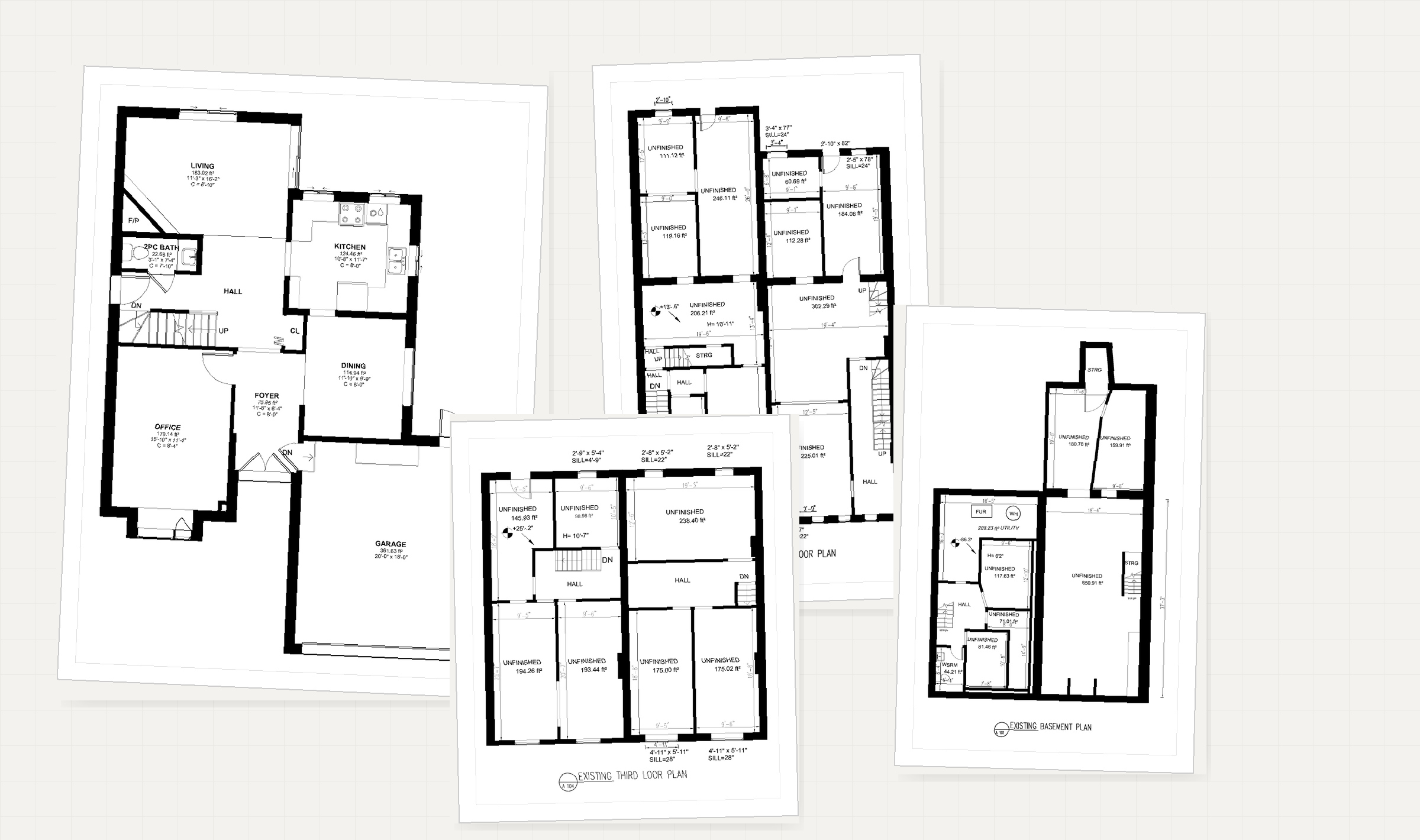
Existing residential first floor plan by Trivion
Commercial barber shop floor plan by Trivion
Existing residential second floor plan by Trivion
Residential basement plan by Trivion
Front and rear isometric point cloud views
Front elevation point cloud with measurements
Roof elevation and roof plan point cloud measurements
Existing front and rear exterior elevations with level markers
Existing 3D model views, four isometric perspectives
Existing roof plan with dimensions
10+ yrsin measurement & CAD
200+as-built projects delivered
±5 mmtypical scan accuracy
24 hrstypical quote turnaround
Engineering review

Reviewed by a licensed engineer.

Every drawing is checked by a licensed engineer before delivery, in partnership with Kernel Engineering.

Professional Engineers Ontario Kernel Engineering is licensed by Professional Engineers Ontario.

Services

Architectural as-built, 3D scanning, site plans, and virtual walkthroughs. We scope each job to what it needs, from a single unit to a full building.

Request pricing

3D site & point cloud

Accurate point clouds ready for Revit, AutoCAD, and Civil 3D.

Explore

Site plans

Footprint, driveways, decks, and site context drawn to permit-ready scale.

Explore

Virtual walkthrough

360° tours with floor-plan navigation and a measurement tool.

Explore

How we capture a building

From the site visit to files your team can open.

01 · Capture

On site

Laser scanning and photogrammetry, with floor levels read by hydrostatic altimeter and verified against measured reference points.

02 · Process

In-house

Processed in-house into the formats your team uses. No conversion steps on your end.

03 · Deliver

Ready to use

Drawings, models, and point clouds for Revit, AutoCAD, and Civil 3D. Ready to open and build on.

.rcp.e57.las.dwg.rvt.pdf

Selected drawings

A few recent samples. Click any tile to view at full size.

Open full gallery

Virtual walkthroughs

360° tours of real spaces with a floor-plan navigator and a measurement tool. Shared by link, embeddable anywhere.

More walkthroughs

Residential walkthrough

Interior 360° tour with floor-plan navigation and measurement support.

Commercial walkthrough

Tenant-space walkthrough used for remote scoping and trade coordination.

Project workflow

Four steps from first contact to delivered files.

Send the scope

Address, project type, existing drawings, required deliverables, and timeline.

Confirm the work

We confirm site access, drawing level of detail, deliverables, and any scan requirements.

Measure on site

Spaces are scanned, photographed, and documented for drawing or walkthrough production.

Deliver final files

DWG, PDF, RVT, point cloud, and walkthrough links are issued together, ready to use.

What clients say

Feedback from architects, contractors, and property owners we've worked with.

5.0 From past project work

Frequently asked questions

The questions we hear most often. Don't see yours? Send it through.

How fast can you turn around an as-built?

Floor plans on their own are typically 2 to 3 business days from the on-site capture. A fuller package with elevations and roof plans runs 5 to 8 business days. Larger or multi-storey buildings, point-cloud scans, and Revit models scale from there. We commit to a specific date in your quote.

What file formats do you deliver?

The defaults are .dwg and .pdf for drawings, .rvt for Revit models, and the point cloud in .rcp / .rcs / .e57 / .las / .laz. Walkthroughs are delivered as a hosted URL plus an embed snippet. Other formats (Civil 3D, BricsCAD) on request.

Can I get a point-cloud file I can use in Revit myself?

Yes, and we encourage it. Every 3D scan project includes a Revit-ready file you can attach in seconds. Your design team can then model on top of measured reality instead of trusting old PDFs.

Do you handle permits or stamped drawings?

We produce the measured, dimensioned base drawings. Sealed submissions are handled by a licensed architect or engineer: yours, or our partner Kernel Engineering. We deliver in whatever layer and titleblock standard they use.

What do you need from me to quote?

The address, project type (residential, commercial, industrial), approximate area, the deliverables you need, and your timeline. Any existing drawings or photos help. Most quotes come back within 24 hours.

Isn't this overkill (and expensive) for a simple project?

No. We scope each job to what it needs, and pricing follows the scope. You are not charged for detail your project would never use. Small jobs stay small-job priced.

How do you measure floor elevations and slopes?

For elevation-critical work (slab flatness, ramp slopes, multi-storey level transfer, settlement readings) we use a hydrostatic precision altimeter. It reads relative height to roughly ±0.05 inch across a 200 ft run, holds accuracy where a rotary laser loses line of sight, and pairs cleanly with the scan data.

Where do you work?

Across the Greater Toronto Area. Mississauga, Toronto, Brampton, Oakville, Burlington, Vaughan, Markham, Richmond Hill, and surrounding municipalities. For projects outside the GTA, ask and we'll let you know.

Request a quote

Include the address, project type, the deliverable you need, and your timeline. Attach any drawings, photos, or sketches you already have. Most quotes come back within 24 hours.

Phone

416-689-7462

Service area

Mississauga, Toronto, Brampton, Oakville, Burlington, Vaughan, Markham, Richmond Hill, and the GTA.

  • An NDA is signed on request; your drawings and tenant information stay confidential.
  • You receive every source file. None of your data is locked to us.
  • Each set is checked against the field measurements before it is issued.

Drop files here, or click to browse

PDF, images, DWG, DXF, RVT, SKP, ZIP. Keep each file under 3.5 MB and the total under 4 MB. Send larger files by email.